Teaching AI at Elementary School
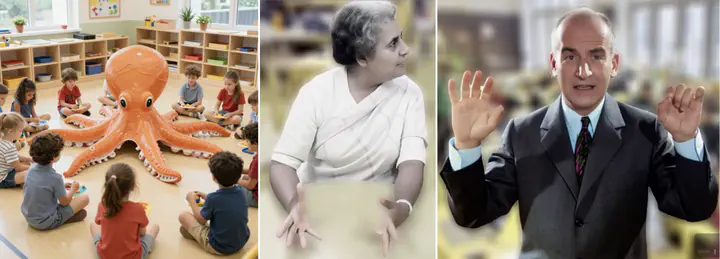
I am super happy with my daughter Kate’s school! The Montessori system is very clever, as it places children of different ages into one class; then, children form working groups according to their skills. The children work with older children on subjects they are mastering well and with younger children if they need more time to consolidate their learning.
Last fall, the school asked parents to teach the children about their professions; what a program they got! For example, a neuro-surgeon who investigates the source of consciousness through fMRI scans, a heart surgeon, a high-frequency trader, an aviator, an architect, a politician, and…. a computer science professor :-) These encounters helped give meaning to the children’s learning and opened their imaginations to the scientific and technological careers of tomorrow.
The requirements were:
- Duration: 1 hour
- Listeners: 40 Children & 5 teachers
- Ages: 6-11
- Recommendation from the teachers: Make it interactive!
I set myself as main goal: show many interactive demos that include the listeners as much as possible. The AR part was easy, as we simply showed a controllable virtual dinosaur demolishing the room, as well as a makeup try-on application.
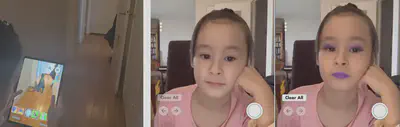
For the Generative AI (GenAI) part, I wanted to show the generation of images and videos that incorporate all listeners. Due to the short time available, it was very challenging. I had to design workflows that are:
- Extremely high-speed
- Failsafe (no time for cherry-picking results!)
It was an unexpected adventure that took me more time than I would have predicted!
Preparations
As demo platform, I was using my regular setup (multiple 4 x H100 servers running in the university’s data center), so compute power was not an issue. With ComfyUI, I was sure to be able to run the latest bleeding edge GenAI models.
As there were many more children than teachers, my rough plan was:
- Image generation: include children
- Video generation: include teachers
Image Generation
My first idea failed hard, even though I tried very hard to make it work. This took most of my preparation time!
- Divide children into 5 groups of: 8 children and 1 teacher
- Give them a flyer with multiple template images that show groups of 4 people, e.g. movie posters, sports scenes, classical paintings, etc.
- Let them take 2 photos per group, matching 2 of the template images
- Use GenAI to blend the children with the characters in the template images
I estimated that all this could be completed in 15 minutes, as the two phases (taking photos, image generation) would be massively parallel 😉.
Unexpectedly, the open source models that I tried (Flux2 Dev, Qwen-Image-Edit) failed to give consistent results. In my extensive tests, I discovered that while nice generations can be really very nice, there are just way to many failures when trying to swap in 4 humans at the same time.
In the end, untypically for me, I even tried closed weights models. It did not go much better.
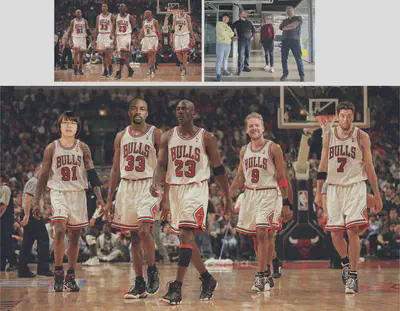
I finally decided to do this part completely different: use a high-speed, high-quality image generator and let the children come up with the prompts! This worked beautifully. We went for Z-Image, as it can generate 1 megapixel images in just over 1 second.
Video Generation
This part was way easier, as the overall throughput needs to be lower than the image part. I prepared a WanAnimate workflow that can generate a 10 second video in 1 minute. As steps during the class, I planned:
- Teachers select a photo of a prominent person
- We record a short video of the teacher
- Use GenAI to replace the teacher with the famous person.
Show Time!
Images
First, Kate and me demonstrated the capabilities of Z-Image:
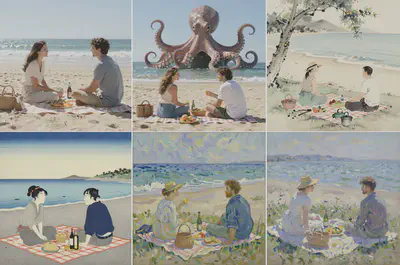
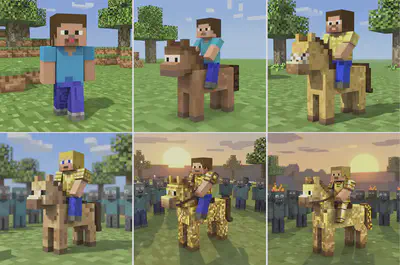
Then, the children in the class could tell me their prompts. Here are some results:
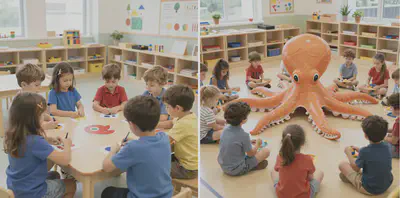
)](/ai/school/z-kids3_hu9db9e4ef8eb7215112ccffb284276325_162678_20424f0b7866d4802d689a1140551717.webp)
Videos
First, I showed a slide with: the basic effect of replacing subjects in a video (left), for different subjects (middle), and videos (right):
Then, generation time started! Note that I have blurred the children and the faces of teachers to preserve privacy. The first teacher decided to swap herself with Indira Gandhi:
The second one was a fan of Louis de Funès:
In between those, I made a funny mistake as I forgot to swap the input images, so we have Indira Ghandi moving like Louis de Funès 🙈
Feedback
I was glad about the results! During the demonstrations, the children were absolutely mesmerized. Right after the presentation, a boy came to me with glowing eyes and told me: “I want to learn how to do this!”.
Afterwards, I received several messages from parents, who thanked me and described how excited their children came home after school on that day! The funniest feedback was from another parent: “So, when are you gonna teach this class to us parents?” (shameless plug: you can already book me for the adult version of this class!).
Looking forward to teaching this class again next year!
Acknowledgements
- ComfyUI team for creating an amazing tool
- Kijai for the WanAnimate workflow template
- enigmatic_e for answering my questions related to WanAnimate

Christian Sandor
Professor
Interested in Augmented Reality, Artificial Intelligence, and Human Perception